
Read every page in your own language
Pick a screenshot of the page. Every bubble comes back in your language, with the art left as drawn.


The same page, in your language
Choose a language and watch the same page come back in it. These are real Mangit results on our own sample art. Nobody edited them after.
31 languages in the app. The language of the page is detected for you.


Works on the pages you read
Black and white or full color, right to left or a long scroll. Bubbles, captions and sound effects all come back in your language.


Manga
Japanese, right to left, vertical text


Manhua
Chinese, painted color


Sound effects
Big hand-drawn SFX too
Our own sample pages, shown in English. The page at the top is a manhwa.
Three taps from stuck to reading
- Pick a screenshotTake a screenshot in your reader app, or choose any image of a page from your photos.
- Choose your language31 languages. You never pick the source language: Mangit works it out.
- Read, compare, keepFlip between the original and your language. Save the page, or share one panel.
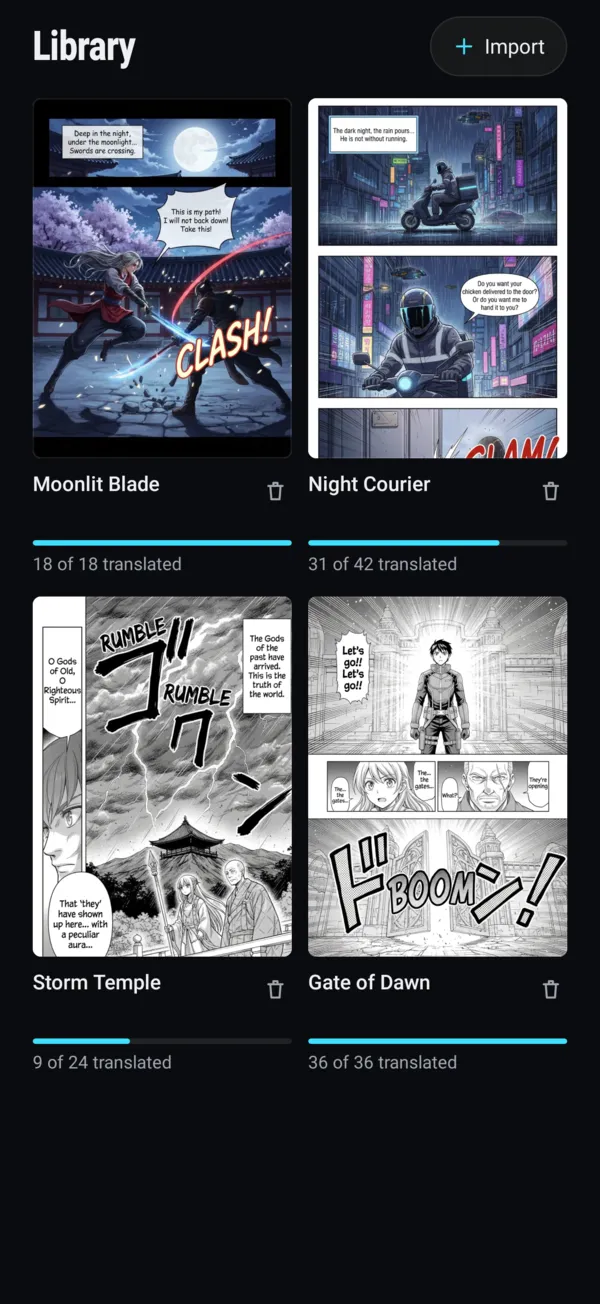
Got the whole chapter? Keep reading.
Import a PDF or CBZ file into Library, up to 500 pages, and translate page by page as you read. Switch between the original and your language any time.
Translating in Library needs Premium.
No account needed, and your page isn't kept
- No sign-up
Mangit signs you in anonymously on first launch. No name, email or password needed.
- Deleted after use
Your page goes to our AI provider to be translated. They delete it after about an hour, and the result after about 24 hours.
- Saved on your phone
Your translated pages live on your device. Our servers don't store your page images.
Guides for readers
Honest answers to what readers ask: how to translate a page or a webtoon, which way to read the panels, what a sound effect or an honorific means.
- How to translate a manga page into your languageText overlay, browser extension or a redrawn page: what each way gives you.
- How to translate a webtoon into your languageScreenshot the strip in sections, overlap a little, and read each one in your language.
- How to read manga panels in the right orderStep through a sample page panel by panel, right to left or left to right.
- Manga sound effects: what does that SFX mean?Search Japanese, Korean and Chinese sound effects by sound or meaning.
- Korean honorifics: what -nim, oppa and sunbae mean in manhwaSearch -nim, -ssi, oppa, hyung, sunbae and more, with what each says about a scene.
- Manga vs manhwa vs manhua: what is the difference?Where each comes from, which way you read it, and where webtoons fit.
Questions
Is Mangit free?
No. Mangit is a paid app: you can subscribe or buy one-time page packs, and there is no free trial. The app shows the price for your country before you pay, and the App Store or Google Play handles the payment.
Which languages can I read in?
31, including English, Vietnamese, Indonesian, Portuguese, Spanish, Arabic, Thai, Turkish and French. You don't choose the language of the page: Mangit detects it.
Does it work on manhwa, manhua and webtoons?
Yes. Manga, manhwa, manhua, webtoons and other comics. For a long webtoon strip, take a screenshot of the part you're reading. One image can be up to 10 MB.
Will every line be right?
Not always. AI can get a line wrong now and then, especially jokes and wordplay. You can always flip back to the original to check. A page that fails to translate doesn't use a page.
Can I take a photo with the camera?
Not inside the app. Take a screenshot or a photo first, then pick it in Mangit from your photos or files.
Do I need an account?
No. Mangit signs you in anonymously the first time you open it.
What happens to my pages?
The page is sent to our AI provider to be translated. They delete it after about an hour and the result after about 24 hours. Your translated pages are saved on your phone. Details are in the privacy policy.
How do I cancel?
In your App Store or Google Play subscription settings, at least 24 hours before it renews. Page packs never renew.
Your next page, in your language.
Mangit is on iPhone and Android.